
Article 1 of 5: Understand the Dashboard
Important — Journal Entries and Reports
GSI creates a Journal Entry for each transaction and bank transaction (Transactions) it processes. If a Transaction does not have an Accounting Status of Booked, it is invisible to your Reports and does not count towards Dashboard totals.
Ensuring all Transactions have an Accounting Status of Booked is your highest priority — until then, your numbers are incomplete.
Go to: Dashboard — https://app.gsi-tech.ai/dashboard/home
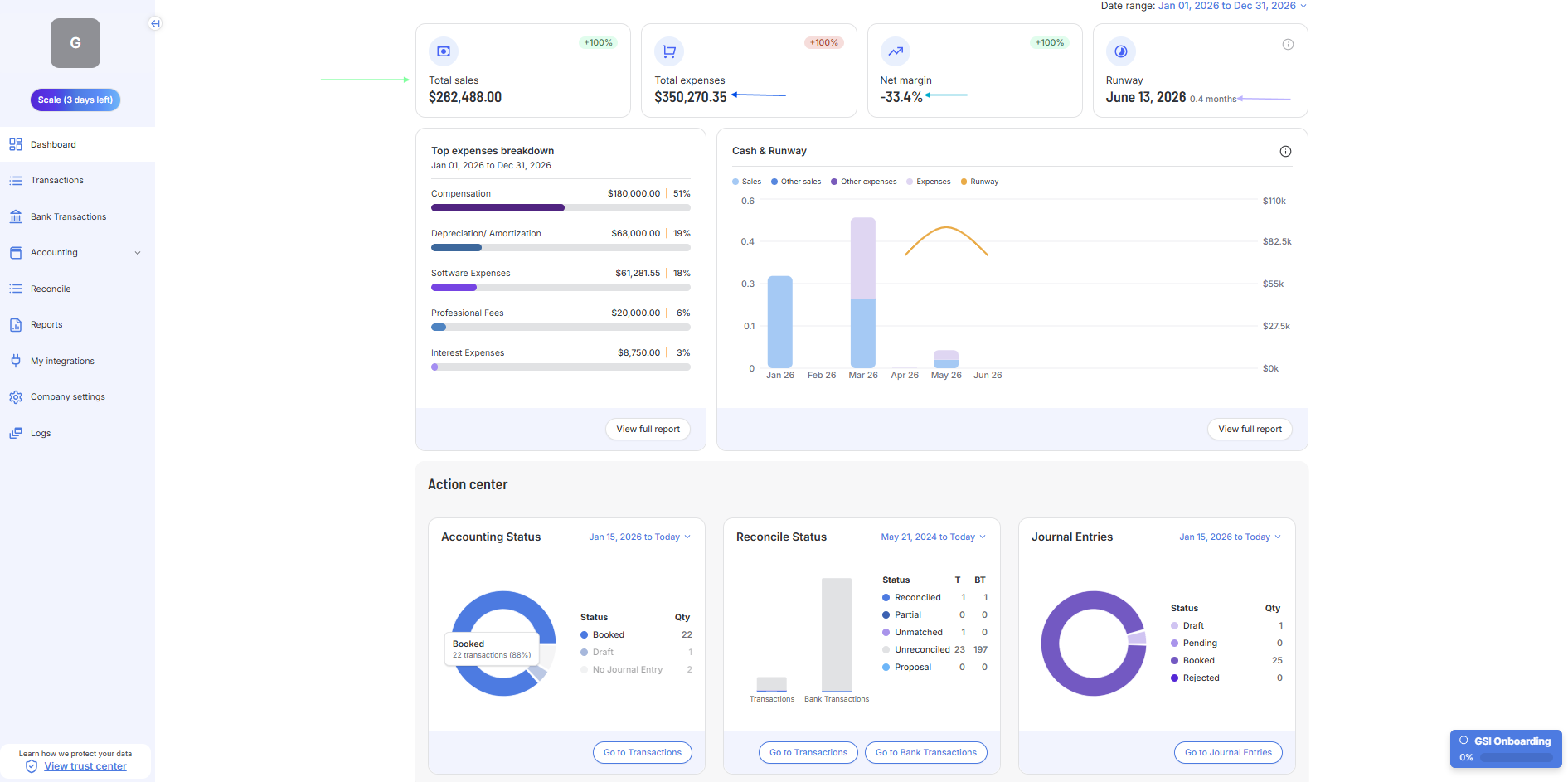
KPI Card | What it tells you |
|---|---|
Total Sales | All income recognized this period. If this looks low, check for missing Journal Entries (Green Arrow in Screenshot) |
Total Expenses | All spending this period. Click 'View full report' on the breakdown to see categories (Dark Blue Arrow in Screenshot) |
Net Margin | Net profit on sales. Negative means you spent more than you earned this period (Light Blue Arrow in Screenshot) |
Runway | Months of cash remaining at your current spending rate. It is potentially your most important number — based on your bank statements (Purple Arrow in Screenshot) |
Next → Find the Action Center